Compliance and safety

Know where you stand before the auditor does.

Your FMCSA record explained, accidents handled step by step, driver files and drug and alcohol testing in one place. Included in Fleet TMS at no extra charge, or on its own for $15 a truck.

Unlimited office users. Keep the dispatch software you use today.

Safety record and score forecast · Recorded in the app, demo company

Two ways to have it. Both are simple.

Built into Fleet TMSIncluded

No extra charge on Owner-Operator, Standard and Enterprise. Everything on this page, plus fraud protection on every load you dispatch.

  • Units turn red on the load when they are out of service
  • DockMatch, carrier record watch and bank-change holds
  • Drug test costs deducted from the driver's settlement
See Fleet TMS plans
On its own, next to your dispatch software
$15per truck a month · $49 minimum (up to 3 trucks)

A 10-truck fleet pays $150 a month. Every office user is free. Billed on your active trucks, counted each night; a change starts at your next renewal.

  • No dispatch, invoicing or settlements to learn
  • Add the rest of Fleet TMS later; your data carries over
  • Cancel any time; you keep access to the end of the month paid
Start a safety account
01

Your FMCSA record, explained

See what moves your scores and what falls off next, instead of reading the raw record.
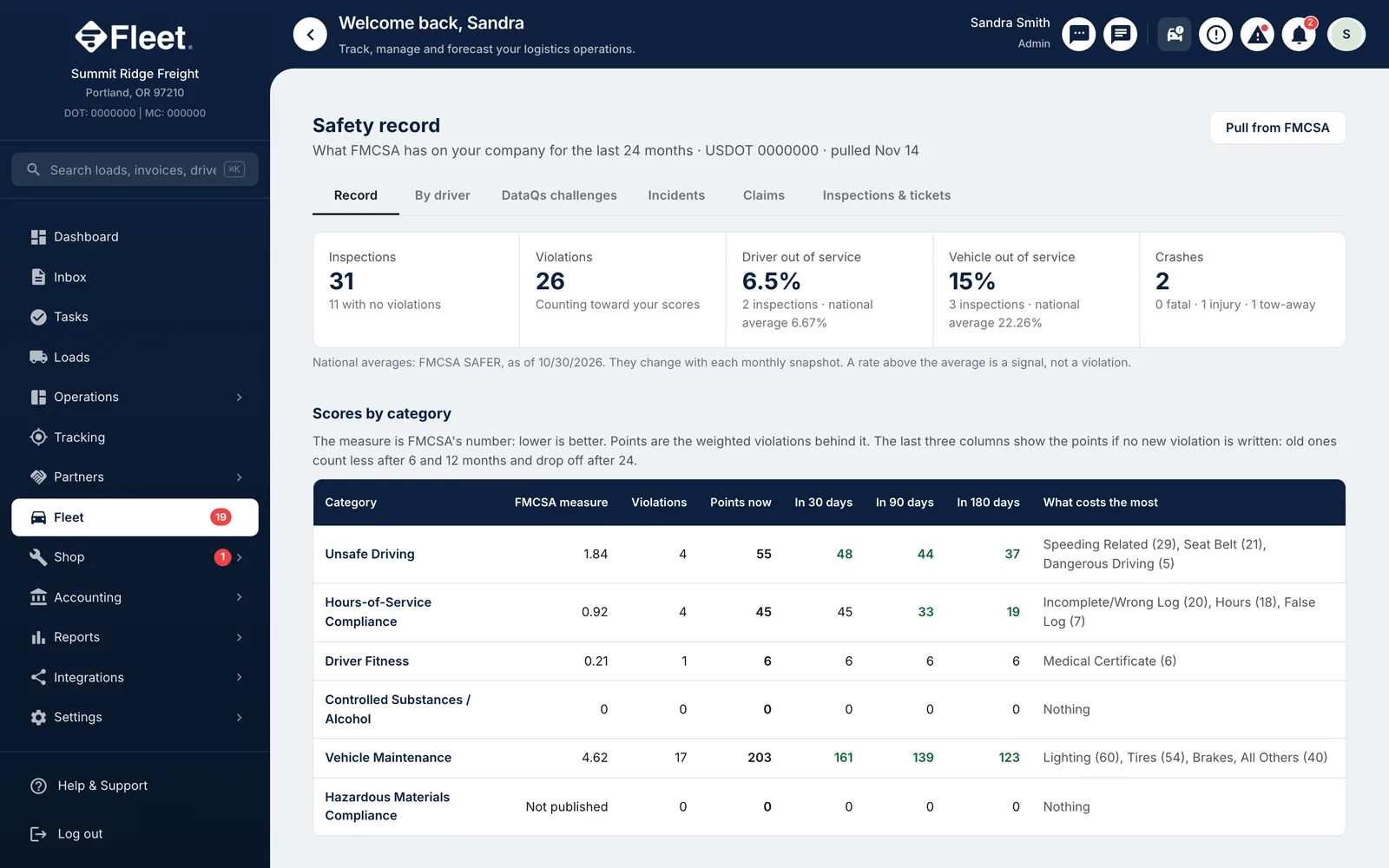
Inspections, violations and crashes
Pulled from FMCSA and refreshed every 28 days, next to the national out-of-service averages.
Where your scores are headingNew
Points per category today and in 30, 90 and 180 days, and which violations step down or drop off in the next 90 days.
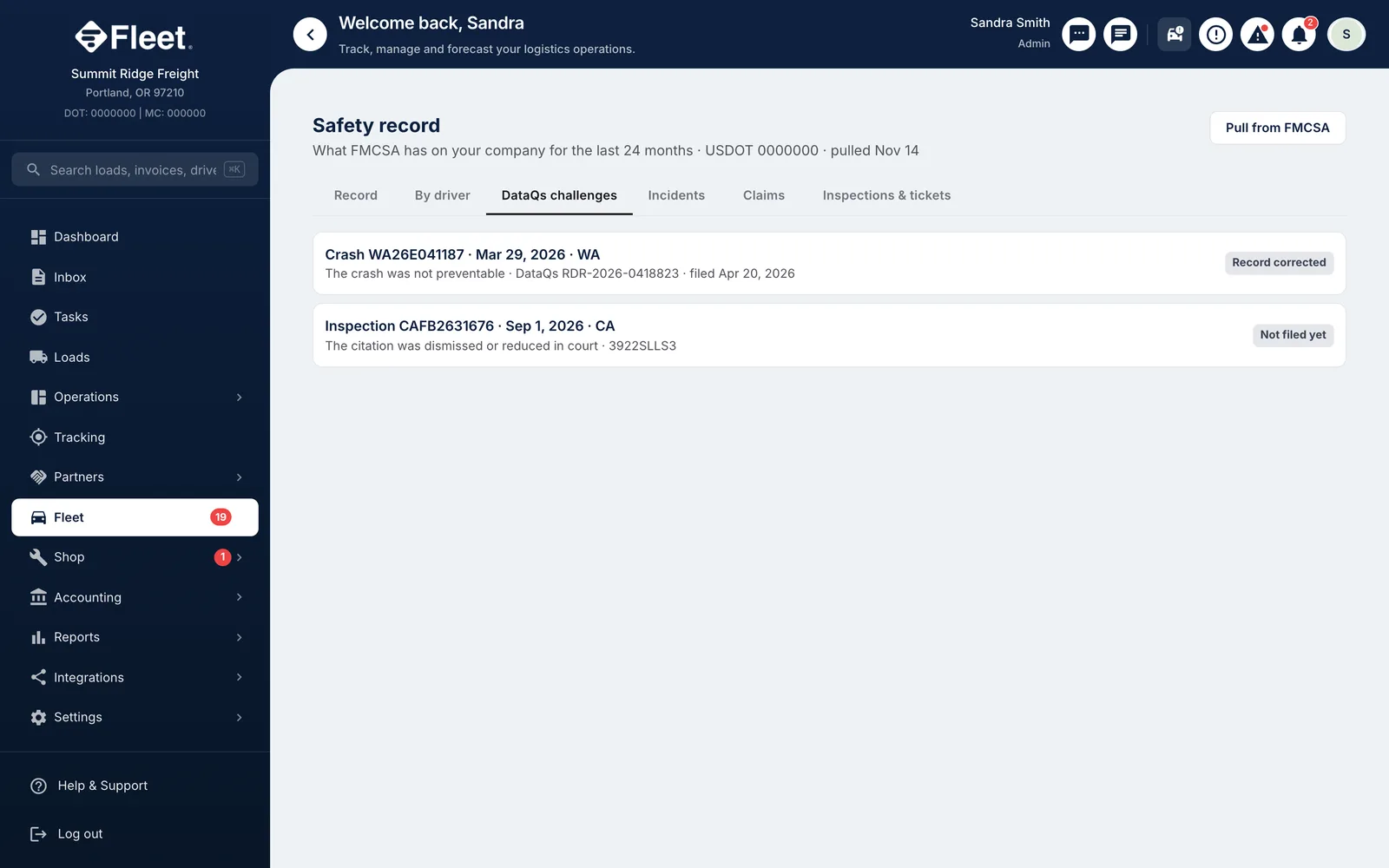
DataQs, with what is worth challenging
Which records to challenge, why, and the evidence to send. The request is drafted for you; you file it with FMCSA.
A scorecard for every driver
See which drivers bring the inspections and violations.
Your own DOT record watched nightlyNew
An alert if the contact details on your record change, so a takeover of your authority is caught early.
Safety record: inspections, violations, out-of-service rates and scores by category with 30, 90 and 180 day columns
Your record and where it is heading · Real screen, demo company
DataQs challenges: a corrected crash record and a dismissed citation
DataQs: what is worth challenging · Real screen, demo company
02

When something happens on the road

Report it once and follow the list. The deadlines are worked out for you.
Accident report, step by stepNew
Tells you whether the crash is DOT-recordable and when post-accident testing is due, then gives you the checklist.
The accident register, ready
The register FMCSA expects you to keep, exported as a spreadsheet.
Claims followed to the endNew
Claimant, insurer, amounts, the next step and who it is waiting on.
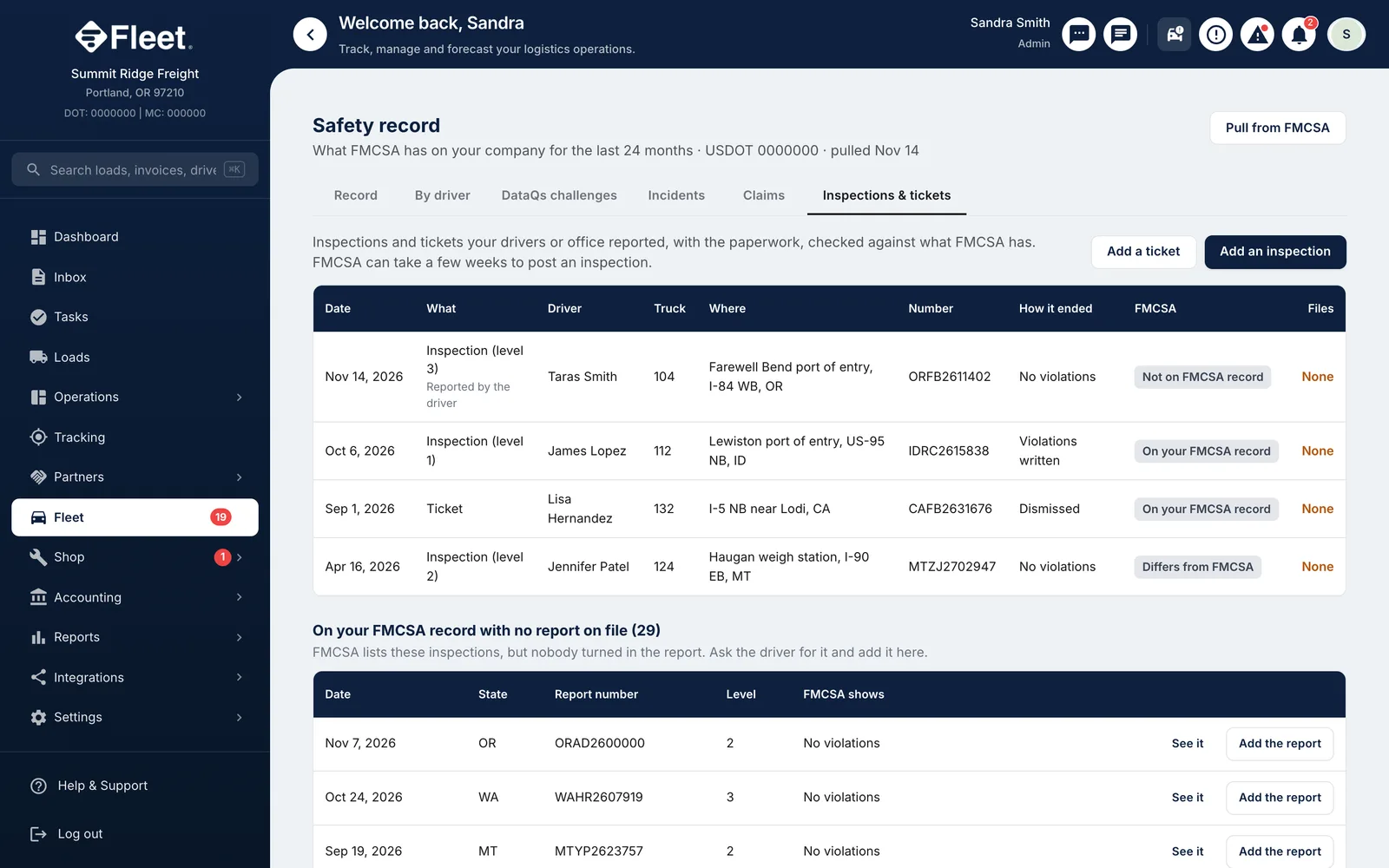
Roadside inspections and ticketsNew
Drivers send a photo from the app. Each report is matched to your FMCSA record, and inspections nobody reported are flagged.
Report an accident: where, who, then plain yes or no questions · Recorded in the app, demo company
Roadside inspections and tickets matched against the FMCSA record
Roadside reports checked against FMCSA · Real screen, demo company
03

Drivers, from hiring to testing

Driver files that keep their own dates, and drivers who send their own paperwork.
Drug and alcohol testingNew
Order the test, choose who pays. A failed or refused test opens a return-to-duty case with the SAP steps. Drivers see their orders, never the results.
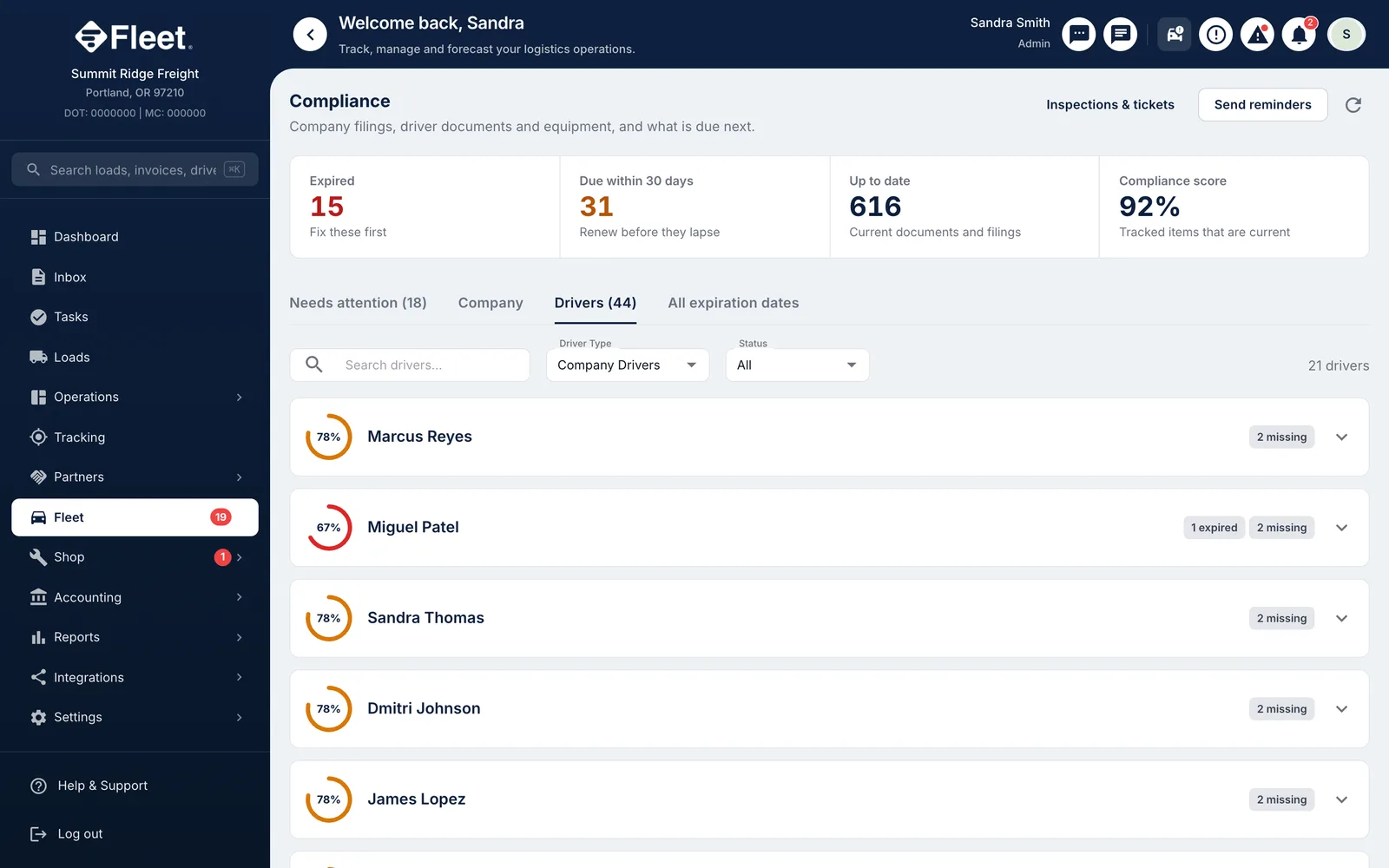
Driver files with expiry dates
CDL, medical card, MVR, drug test, hazmat and the annual Clearinghouse query, each with its date and what is coming due.
Drivers upload from the appNew
A new license or medical card comes in from the driver's phone. You approve it before the date on file changes.
AI reads the expiry date
Upload a document and the date is read for you. Uses a few tokens per document.
Hiring packets with e-signatures
Application, W-9, background check authorization and more, signed on a phone. The driver is created from their answers.
Hours of service from your ELD
Connect Motive, Samsara or Geotab and see each driver's clocks.
A return-to-duty case, then ordering a test · Recorded in the app, demo company
Driver compliance list with expired and due-soon items per driver
Driver files: what is expired and due · Real screen, demo company
04

Trucks and trailers

Papers, inspections and permits for every unit, ready at the roadside.
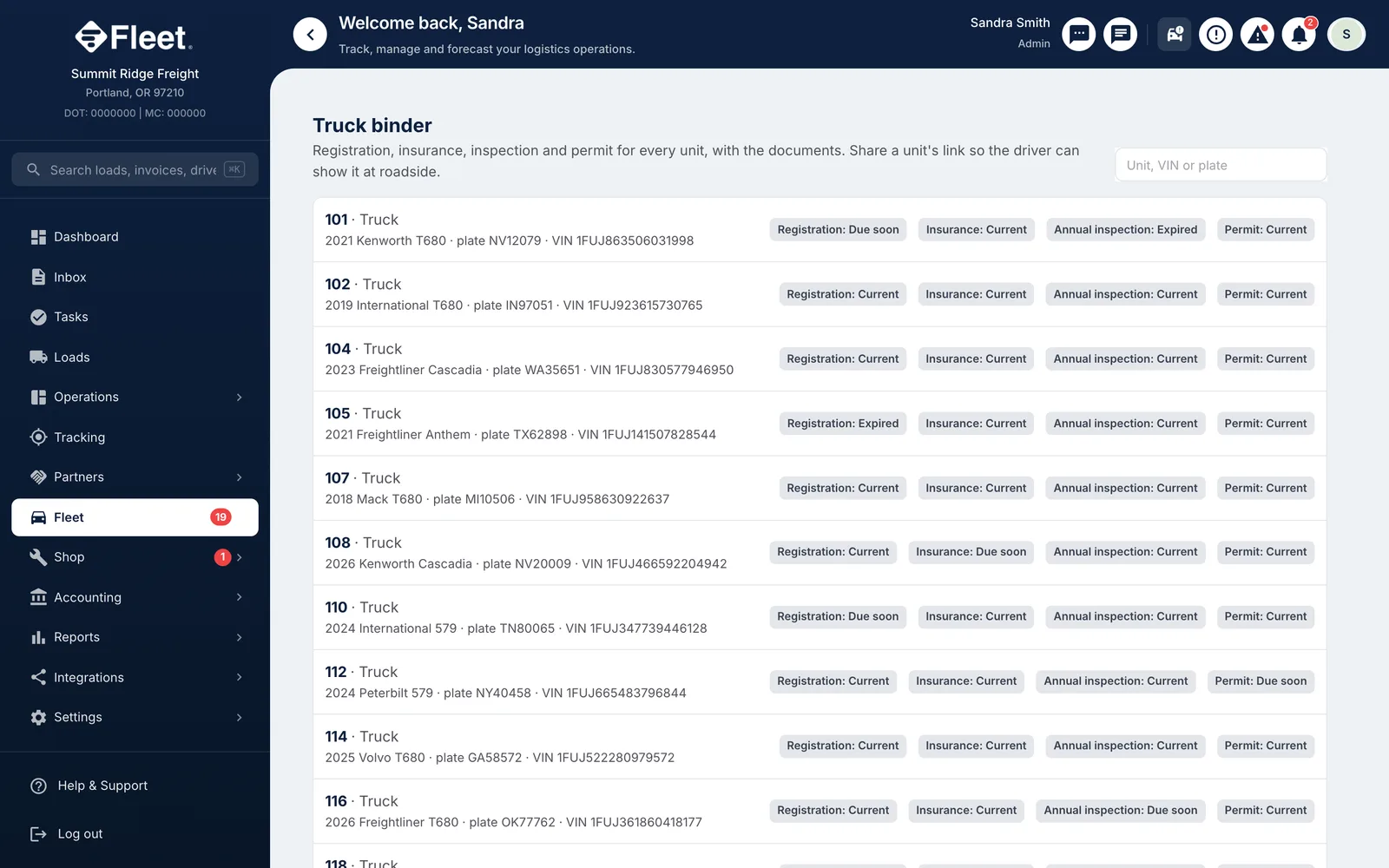
Truck binder with a share linkNew
Registration, insurance, annual inspection and permits per unit, shown from a link when an officer asks.
Inspection planning
Units due for the annual inspection, with shops along their route.
Permits, with a guide per state
Request, order and file oversize, overweight and state permits, with where to get each one.
Out of service until it is fixed
Repairs, out-of-service and return-to-service on record, with photos. In Fleet TMS the unit turns red on every load.
Truck binder listing registration, insurance, annual inspection and permit status per unit
Truck binder for every unit · Real screen, demo company
Click a truck on a load, report the problem · Recorded in the app, demo company
05

Fraud protection on every load

Built into Fleet TMS dispatch, at no extra charge.

DockMatchNew
The shipper's dock gets the carrier, driver and truck to expect, and the driver shows a PIN from the app. Also sold on its own.
Carrier records compared every night
A changed email, phone or address on a carrier's FMCSA record raises a flag before the next load.
Bank changes held for a call-backNew
A new bank account or factoring remit-to waits until a second person confirms it by phone.
A load limit for new carriersNew
Carriers without a history hold only a few loads at once. You set the numbers.
What you see is what you get

No concept videos. Every picture here is the real product.

Some software is sold with a polished video of screens that do not exist yet. Every screenshot and clip on this page was recorded from Fleet TMS as it runs today, with a made-up demo company so no real driver or customer shows.

Recorded, not rendered
Each image is labelled “Real screen, demo company”. If it is on this page, you can click it in your account.
New features every month
The “New” tags on this page mark what shipped this season. Your account gets them the day they ship, at no extra charge.
Missing something? Tell us
Ask from Help and Support inside the app. Your request goes straight to the people building Fleet TMS, and you get an answer on it, not silence.

What each way includes

FeatureBuilt into Fleet TMSSafety account, $15 a truck
FMCSA record, score forecast and driver scorecardsIncludedIncluded
DataQs suggestions and drafted requestsIncludedIncluded
Accident reports, register and claimsIncludedIncluded
Roadside inspections and tickets from the driver appIncludedIncluded
Drug and alcohol testing and return-to-duty casesIncluded, cost deducted from settlementsIncluded
Driver files, uploads from the app, hiring packetsIncludedIncluded
Truck binder, inspection planning, permits, out of serviceIncludedIncluded
Your own DOT record watched nightlyIncludedIncluded
Fraud protection on loads (DockMatch, carrier watch, bank holds, load limit)IncludedWith Fleet TMS dispatch
Dispatch, invoicing, settlements, driver payIncludedAdd later, data carries over
Office usersBy planUnlimited, free

Straight answers

Do I have to change my dispatch software?
No. The safety account runs next to whatever you use for loads today.
Is it an ELD?
No. It shows the hours-of-service clocks from the ELD you already have.
Does it file DataQs for me?
It tells you what is worth challenging and drafts the request. You file it on the FMCSA site.
Does it order MVRs or query the Clearinghouse?
Not yet. It keeps the dates and documents and tells you when each is due.
How is the safety account billed?
Monthly, by your active trucks, counted each night. $49 covers up to 3 trucks.
What if we add the rest of Fleet TMS later?
Your drivers, trucks and records stay where they are. Nothing is entered twice.

Start with your DOT number.

$15 a truck, unlimited office users.

Start a safety account